Welcome to the Artist Village where AI agents steal the show! Meet the specialist agents that can research, analyze, write, and create on your behalf. Each one is designed for a specific role, working solo or together as a crew to get things done. Learn more about agents in Microsoft 365 →
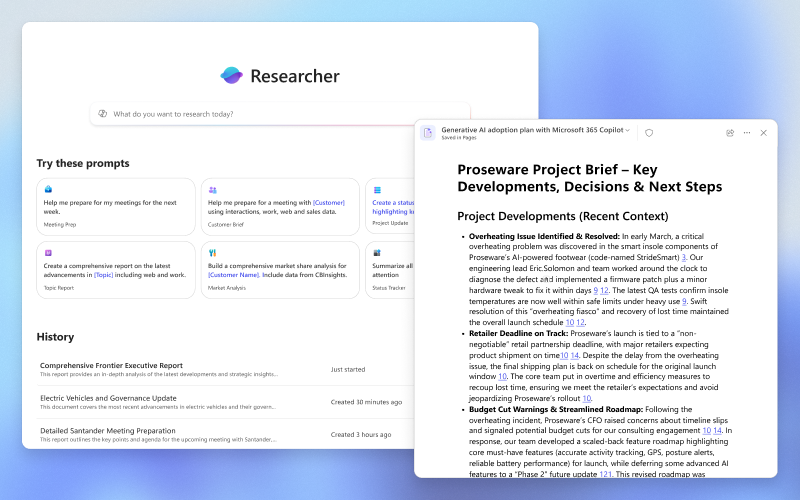
The Researcher agent handles deep, multi-step research so you don't have to. Give it a complex question — "What are our competitors doing in the mid-market segment?" or "Summarise the latest regulatory changes in our industry" — and it synthesises information from your company's own files and the web, producing a structured, sourced briefing in minutes instead of hours.
💡 Think of the hours your team spends pulling together background documents before a big meeting or tender. Researcher does that in the background while you get on with something else — and it cites its sources so you can verify anything it finds.
🎵Available directly in Microsoft 365 Copilot Chat — no setup needed
🎵Searches both your internal company knowledge and live web sources simultaneously
🎵Produces structured outputs: briefings, comparisons, summaries with source links
⚠️ Reality Check — Researcher is powerful but not infallible. It can misinterpret ambiguous questions, surface outdated internal documents, or give more weight to easily findable web sources than to the most relevant internal knowledge. Treat its output as a first draft for human review, not a finished deliverable.
For: Finance, Operations, HR — anyone who lives in spreadsheets
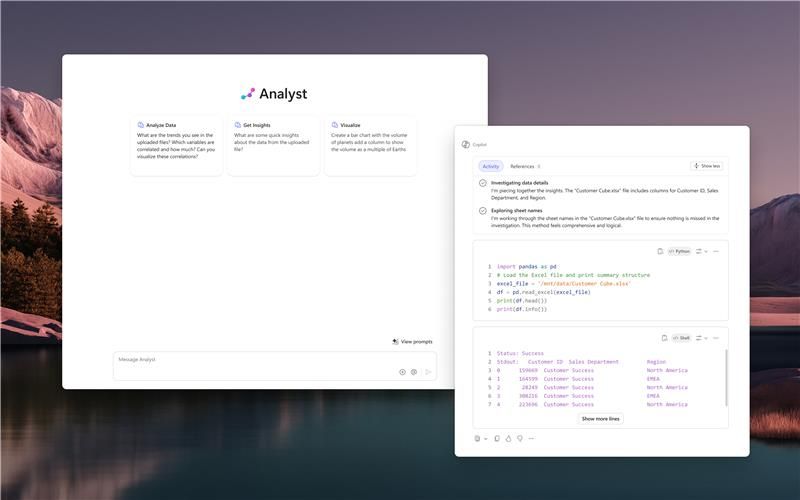
The Analyst agent transforms raw data into clear insights using natural language. Upload a spreadsheet or point it at your data files and ask "Which product lines had the biggest margin drop last quarter?" or "Show me headcount trends by department over the last 12 months" — it does the analysis and produces visualisations without you touching a formula.
💡 Think of the hours your finance or operations team spends building Excel reports that management then asks to be reformatted. Analyst does the analysis on demand, in plain English, and can regenerate it in a different format instantly.
🎵Available in Microsoft 365 Copilot Chat — generally available now
🎵Works with your Excel files, CSVs, and connected data sources
🎵Produces charts, tables, and written summaries side by side
⚠️ Reality Check — The Analyst agent is only as reliable as the data you point it at. If your spreadsheets have inconsistent formatting, merged cells, or hidden assumptions baked in, the analysis will reflect those problems. It also can't replace a trained finance analyst's judgement about why a number matters — it tells you what, not always why.
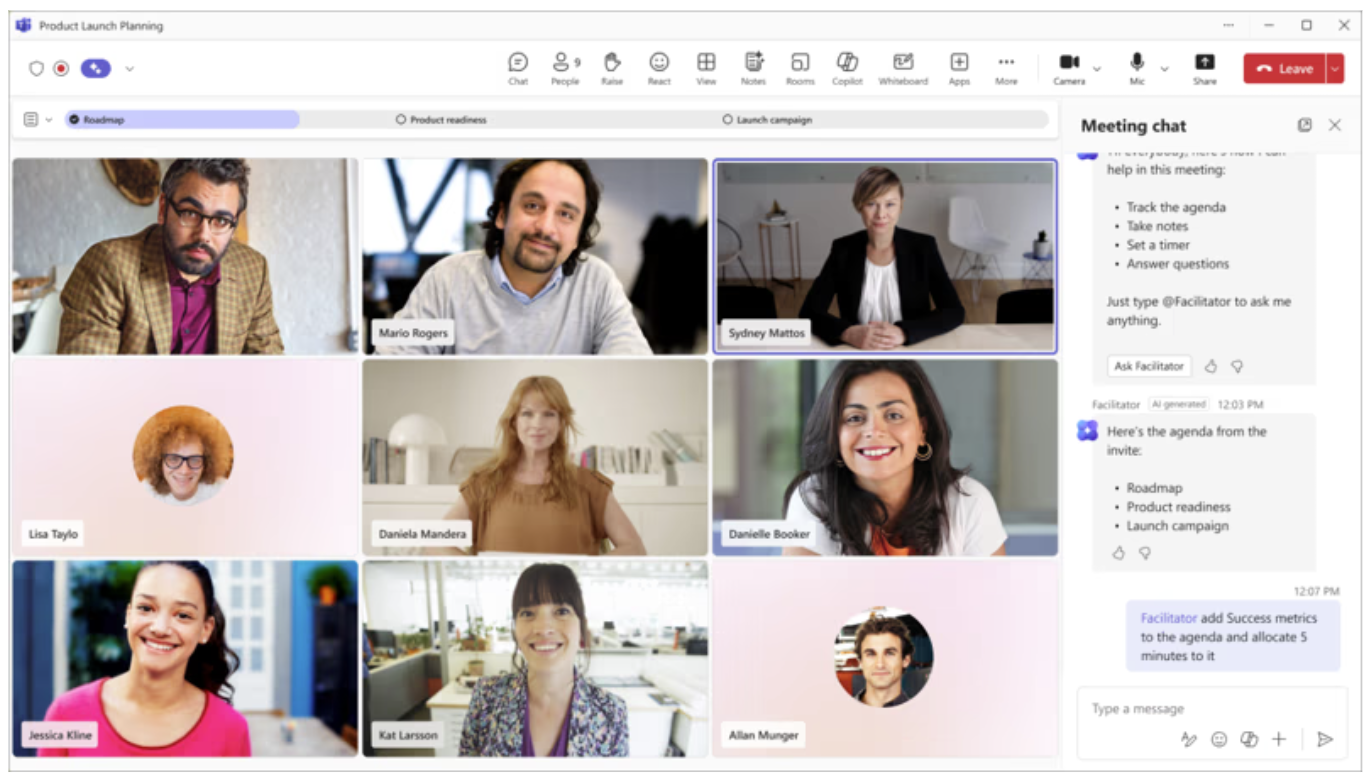
The Facilitator agent joins your Teams meetings automatically, takes notes in real time, captures decisions and action items, and makes them available to the whole team the moment the meeting ends. No more "who was supposed to take notes?" and no more "I wasn't sure if that was a decision or just a discussion."
💡 Think of it as a permanent, reliable minute-taker who attends every meeting, never misses a word, and has the summary ready before everyone has closed their laptops.
🎵Joins Teams meetings automatically — no manual activation needed
🎵Captures decisions, action items, and key points in structured format
🎵Team members who couldn't attend get a full, searchable summary immediately
⚠️ Reality Check — Facilitator captures what was said, not always what was meant. Subtle decisions, off-the-record comments, and nuanced agreements can be misrepresented in automated notes. Some people also find the presence of an AI note-taker changes how openly they speak in meetings — a human dimension worth considering before rolling this out broadly.
For: Global teams, international meetings, multilingual organisations
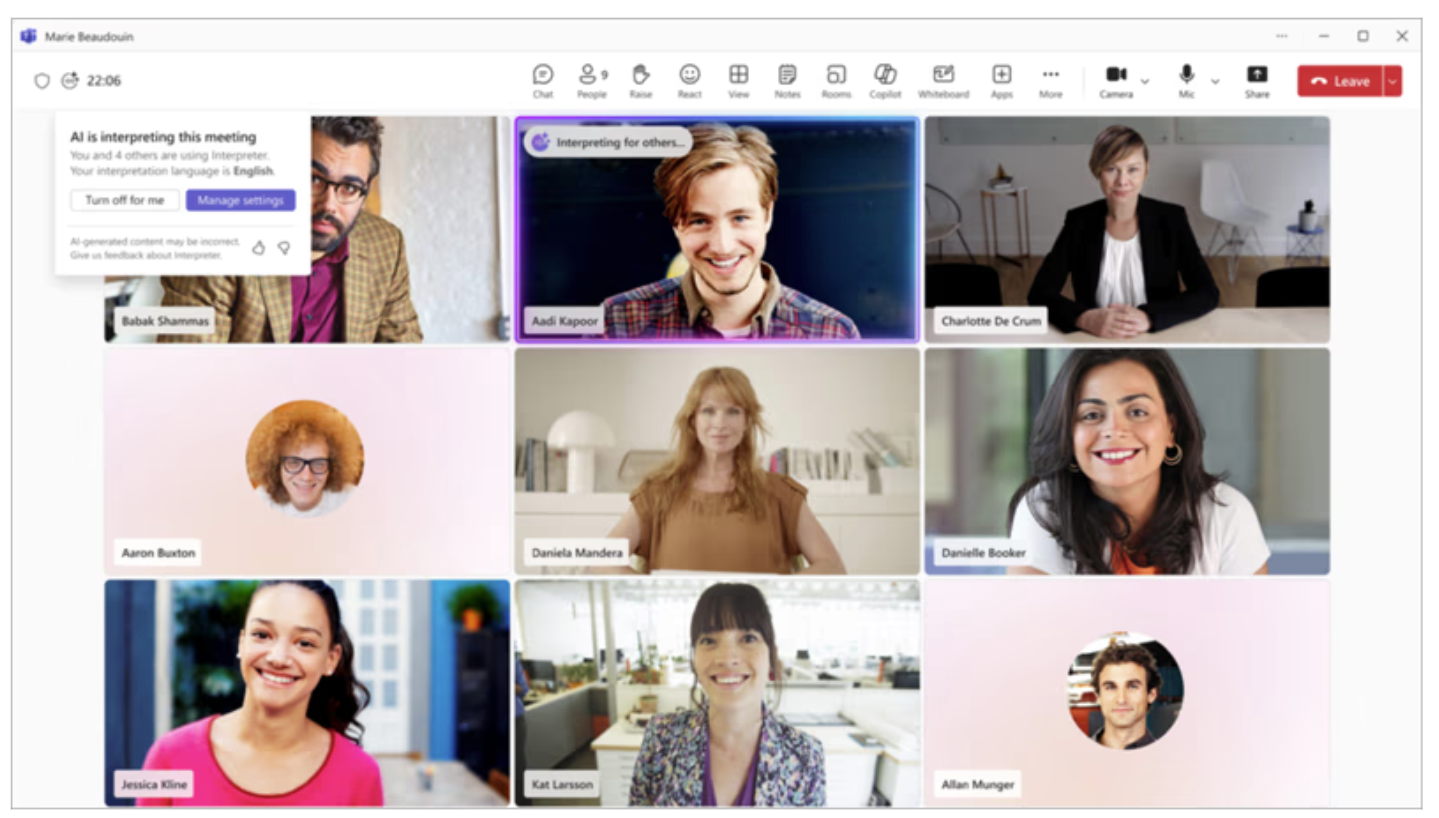
The Interpreter agent provides real-time speech-to-speech interpretation inside Teams meetings — so each participant can speak and hear in their own language, simultaneously, in up to nine languages. No human interpreter needed for routine business meetings.
💡 Think of it like having a simultaneous interpreter in your earpiece during every international call — without the cost or the scheduling overhead. Your French colleague speaks French, you hear English, and vice versa.
🎵Available in Teams meetings — generally available now. Not available in Teams Webinars or Teams Townhalls
🎵Supports up to nine languages simultaneously
🎵Particularly valuable for global town halls, partner meetings, and multinational teams
🎵Participants can choose to have Interpreter simulate their own voice when translating to others or select one of the following preset automated voices: Ava (female), Andrew (male), Fable Turbo (neutral)
⚠️ Reality Check — Automated interpretation handles standard business language well but struggles with idioms, technical jargon, heavy accents, and rapid crosstalk. For high-stakes conversations — negotiations, legal discussions, sensitive HR matters — a human interpreter remains the safer choice.
For: Project managers, team leads, anyone managing tasks and timelines
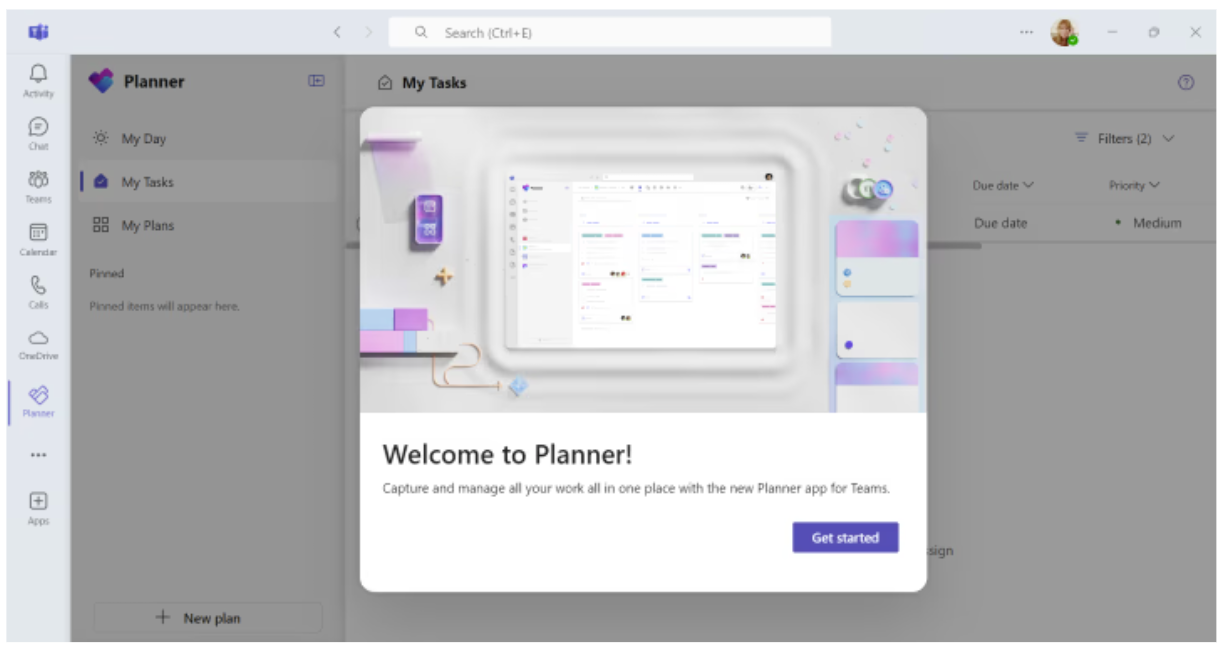
The Project Manager agent automates the administrative side of project management inside Microsoft Planner. It creates project plans, generates status reports, tracks tasks, and flags when things are falling behind — all from a plain-language description of what the project needs to achieve.
💡 Think of the time project managers spend updating task lists, chasing status updates, and formatting progress reports. The Project Manager agent handles the admin so the human project manager can focus on the stakeholders, the risks, and the decisions that actually need human judgement.
🎵Works inside Microsoft Planner — rolling out to public preview now
🎵Creates plans, assigns tasks, and generates status reports automatically
🎵Flags delays and blockers proactively — not just when you check
⚠️ Reality Check — A project plan is only as good as the information it's based on. If team members don't keep their task statuses updated, the agent's reports will be inaccurate. Adoption of the underlying tool is still a human challenge — AI doesn't solve it, it amplifies it in both directions.
For: Sales teams, account managers, business development
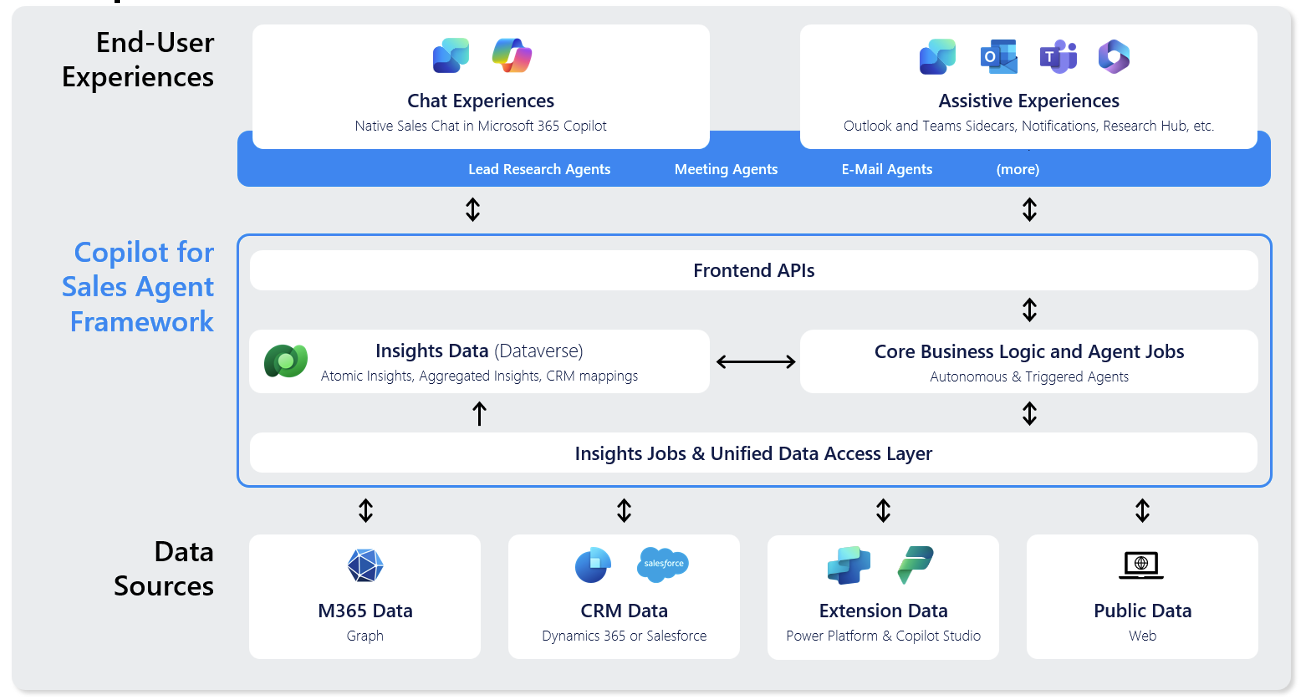
Sales Agent is Microsoft's conversational CRM layer built into Microsoft 365 Copilot. Rather than opening your CRM, switching to Outlook, hunting through Teams meeting notes, and piecing together a picture of an account manually, you simply ask in plain English — right inside Copilot Chat, Outlook, or Teams — and the agent synthesises everything for you. It connects to Dynamics 365 Sales and Salesforce, pulls in your emails, Teams meetings, and CRM records, and gives you a unified view of every account and deal without leaving the app you're already in.
💡 Think of it as a dedicated sales researcher and admin assistant working alongside every rep — pulling the right customer context before every call, writing the follow-up email during the meeting, and updating the CRM after it. The rep focuses on the relationship. The agent handles the paperwork.
🎵Ask "What's the latest with Contoso?" — get an account summary, open opportunities, recent meetings, and sentiment, in seconds
🎵Before a customer call: "Prepare me for my 10am with Fabrikam" — meeting card with CRM data, past topics, and AI highlights appears instantly
🎵After a meeting: agent drafts follow-up email and suggests next steps based on what was discussed
🎵Lead queue management: every lead is automatically researched and pre-scored — disqualify or pursue in one click, no manual digging
🎵Works inside Outlook, Teams, and Microsoft 365 Copilot Chat — @mention the Sales agent wherever you're working
⚠️ Reality Check — Sales Agent is only as good as the data behind it. If your CRM records are patchy, duplicated, or inconsistently maintained, the agent will surface poor-quality insights with the same confidence as good ones. Clean CRM data is not optional — it's the foundation. Quality in, quality out.
For: Customer service teams, contact centres, support desks
Copilot for Service assists customer service representatives in real time — summarising incoming cases, suggesting responses based on your knowledge base, helping maintain consistent answers across the team, and automatically logging resolutions back to your CRM. It works inside Salesforce, ServiceNow, and Dynamics 365, alongside Teams and Outlook.
💡 Think of it as a knowledgeable senior colleague sitting next to every support agent — instantly surfacing the right answer from the knowledge base, suggesting how similar cases were resolved before, and drafting the response so the rep just has to review and send.
🎵Works across Salesforce, ServiceNow, Dynamics 365, Teams, and Outlook
🎵Surfaces relevant knowledge base articles in real time during live cases
🎵Drafts responses and logs resolutions automatically
⚠️ Reality Check — Copilot for Service is only as good as your knowledge base. If it's outdated, incomplete, or contradictory, the agent will confidently surface wrong answers. There's also a real change management challenge: experienced service agents may resist AI suggestions that don't match their instincts, while newer agents may trust them too much. Both extremes need managing.
For: IT and security teams, CISOs, risk officers
Security Copilot helps security teams work faster and smarter. It analyses security alerts, investigates incidents, writes queries in plain language, summarises threat intelligence, and helps teams respond to incidents in a fraction of the time. At Ignite 2025, Microsoft added 12 new security agents covering Defender, Entra, Intune, and Purview — automating everything from phishing analysis to compliance checks.
💡 Think of a security analyst who normally spends 3 hours investigating a suspicious alert — cross-referencing logs, querying systems, writing a report. Security Copilot compresses that to 15 minutes by doing the investigation work automatically and presenting the findings in plain English.
🎵Available to Microsoft 365 E5 customers — included in the licence
🎵Produces plain-English incident summaries — useful for briefing non-technical leadership
⚠️ Reality Check — Security is the area where false confidence is most dangerous. AI-generated security analyses can miss context that an experienced analyst would catch. Security Copilot is a powerful accelerator for security teams — but it is not a substitute for skilled security professionals. It also requires your security data sources to be properly connected and configured, which is itself a non-trivial undertaking.
For: Knowledge workers, HR, operations — anyone who manages documents
SharePoint agents let you create an AI assistant that is grounded in a specific set of documents or a SharePoint site. Point it at your HR policies, your project documentation, your product catalogue, or your compliance library — and anyone in the organisation can ask it questions in plain English and get accurate, sourced answers instantly.
💡 Think of it like giving every employee a knowledgeable colleague who has read every document in a specific folder and can answer questions from it instantly. "What's our parental leave policy?" "What were the key decisions from the last project steering group?" — answered in seconds, with links to the source document.
🎵Available to all Microsoft 365 users — no Copilot licence required to use
🎵Built and published directly from SharePoint — no technical skills needed
🎵Answers are grounded in your specific documents — reducing hallucination risk significantly
⚠️ Reality Check — SharePoint agents are only as reliable as the documents they're grounded in. If your policies are outdated, your agent will confidently cite outdated policies. This is one of the strongest arguments for keeping your SharePoint content well-governed and regularly reviewed — the AI doesn't know a document is three years old unless you tell it.