×Zone 5 · Main Stage
🎸 Main Stage — The Headliners
The crowd goes wild! This is where the headline acts perform. See Microsoft 365 Copilot in action, discover the AI Builder for citizen developers, and witness intelligent agents taking center stage.
Microsoft 365 Copilot is the most visible face of Microsoft's AI. It lives inside Word, Excel, PowerPoint, Outlook, and Teams — the tools most people use every day. It reads your emails, meetings, and documents, and helps you write, summarise, find things, and take action — in plain language, no commands to learn.
💡 Think of it like a highly organised colleague who's attended every meeting, read every document, and can catch you up in seconds. Ask "what did we decide on the project budget last month?" — it answers, pulls the right file, and drafts the follow-up email if you need it.
🎵Summarises long Teams meetings and missed email threads automatically
🎵Drafts documents and presentations using the context of your actual work
🎵Searches across your entire Microsoft 365 world in plain English
🎵Powered behind the scenes by Work IQ — the intelligence layer that learns your habits, your team, and your working style to make responses feel genuinely personal
Real examples you can try today
🎵In Outlook: "Summarise this email thread and tell me what I need to decide before tomorrow's meeting" — Copilot reads 23 emails and gives you three bullet points
🎵In Teams: You missed a 2-hour all-hands. Ask "What were the key decisions and who owns each action item?" — done in 10 seconds
🎵In Word: Paste your messy meeting notes and say "Turn this into a professional project brief for a senior audience, max one page" — it structures, rewrites, and formats in one go
🎵In Excel: "Highlight every row where Q3 sales dropped more than 10% vs Q2 and add a column explaining likely reasons" — no formula knowledge needed
🎵In PowerPoint: "Create a 6-slide executive summary of /Q4-Report.docx for a board audience, minimal text, confident tone" — a presentation draft in under a minute
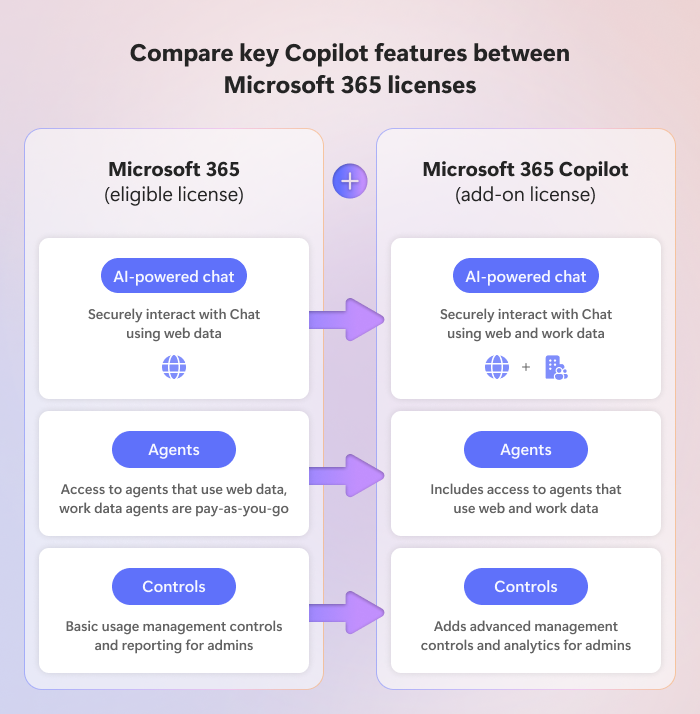
Source: Microsoft Learn
Copilot Studio is Microsoft's platform for building your own AI agents — without needing to be a developer. Using a visual, low-code interface, you describe what you want your agent to do in plain language, connect it to your business data and systems, and deploy it inside Teams, on a website, or wherever your people work. It's how your HR team builds a policy assistant, or your IT helpdesk creates an agent that handles 80% of routine tickets automatically.
💡 If Microsoft 365 Copilot is the ready-made assistant you buy off the shelf, Copilot Studio is where you custom-build one for your specific process — one that knows your HR policies, speaks to your CRM, escalates to a human when needed, and works 24/7 without a lunch break.
🎵No-code / low-code: business analysts and process owners can build agents, not just IT
🎵Can be deployed in Teams, websites, WhatsApp, SharePoint, and more
🎵Connects to hundreds of business systems via connectors and MCP
Real examples organisations are building today
🎵HR policy bot: Employees ask "How many days of parental leave do I get?" — the agent reads your actual HR policy documents and answers instantly, 24/7, without HR needing to respond
🎵IT helpdesk agent: "My laptop can't connect to the VPN" — the agent walks the employee through the top 5 fixes, logs a ticket if none work, and assigns it to the right team automatically
🎵Sales assistant: Before a customer call, the agent pulls the account history from Dynamics 365, summarises the last three interactions, and suggests talking points — in under 30 seconds
🎵Onboarding companion: New starters ask the agent anything about their first week — it answers from SharePoint, books their induction meetings, and escalates human questions to the buddy assigned in the HR system
AI Builder is Microsoft's library of prebuilt AI models that you can add directly into Power Apps, Power Automate, and Copilot Studio agents — without writing code or training models from scratch. It's how business teams add real intelligence to their processes: reading documents, extracting data from forms, detecting sentiment in customer messages, recognising objects in images. The AI is already built. You just connect it to your workflow.
💡 Think of AI Builder like a plugin store for intelligence. Your process already moves data from A to B. AI Builder adds a brain in the middle — one that can read, classify, and understand — before passing the result to the next step. Whether that step lives in a Power Automate flow or inside a Copilot Studio agent, the capability is the same.
🎵Prebuilt models ready to use today: invoice processing, sentiment analysis, text recognition, object detection, business card reader
🎵Works inside Power Apps, Power Automate, and Copilot Studio — wherever your process lives
🎵Custom models also possible — train your own classifier on your own data, still no coding required
Real examples of AI Builder in action
🎵Invoice processing: Supplier invoices arrive by email → AI Builder reads the PDF, extracts vendor name, amount, and PO number → automatically creates a record in Business Central → flags anything that doesn't match for human review. What used to take 4 minutes per invoice now takes 4 seconds
🎵Customer feedback analysis: Every support ticket is automatically scored for sentiment (positive / neutral / negative) and categorised by topic — your team sees a live dashboard of what customers are frustrated about this week, without reading a single ticket manually
🎵Business card scanner: At a conference, you photograph a business card → AI Builder extracts name, company, email, phone → creates a contact in Dynamics 365 → sends a personalised follow-up email via Power Automate. The whole thing runs while you're still at the stand
🎵Contract review trigger: A new contract lands in SharePoint → AI Builder reads it, extracts key dates, parties, and value → flags anything above a threshold to the legal team → logs everything in a compliance list automatically
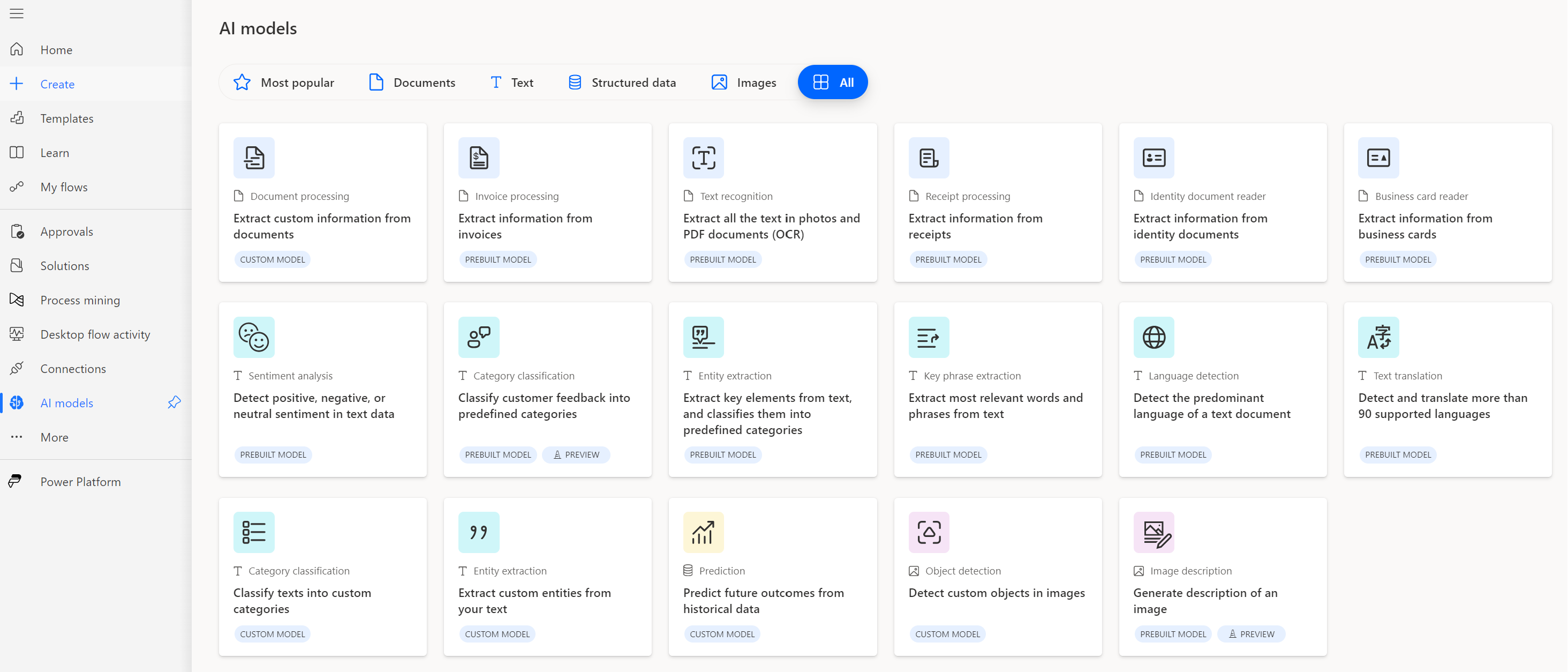
Source: Microsoft Learn
Both tools let you build AI agents — but they're built for different audiences, different complexity levels, and different use cases. Here's how they compare side by side.
| Feature | Copilot Agent Builder | Copilot Studio |
|---|
| Target User | Any M365 user | Developers / IT / Enterprise |
| Ease of use | Very high (no-code) | Medium (low-code/pro-code) |
| Scope | Simple agents | Complex business agents |
| Actions and integrations | Limited to M365 data | APIs, Power Automate, RPA, external data |
| Usage channel | Copilot only | Multichannel: Teams, Web, WhatsApp, etc. |
| Licensing | Included with M365 Copilot | Requires Power Platform enablement |
💡 Think of Agent Builder as the quick-start option — great for anyone who wants a simple helper inside Copilot. Copilot Studio is the full workshop — for when you need agents that connect to external systems, follow complex logic, and deploy across multiple channels.
🗺️ Which tool should you choose?
Use this decision tree to find the right fit:
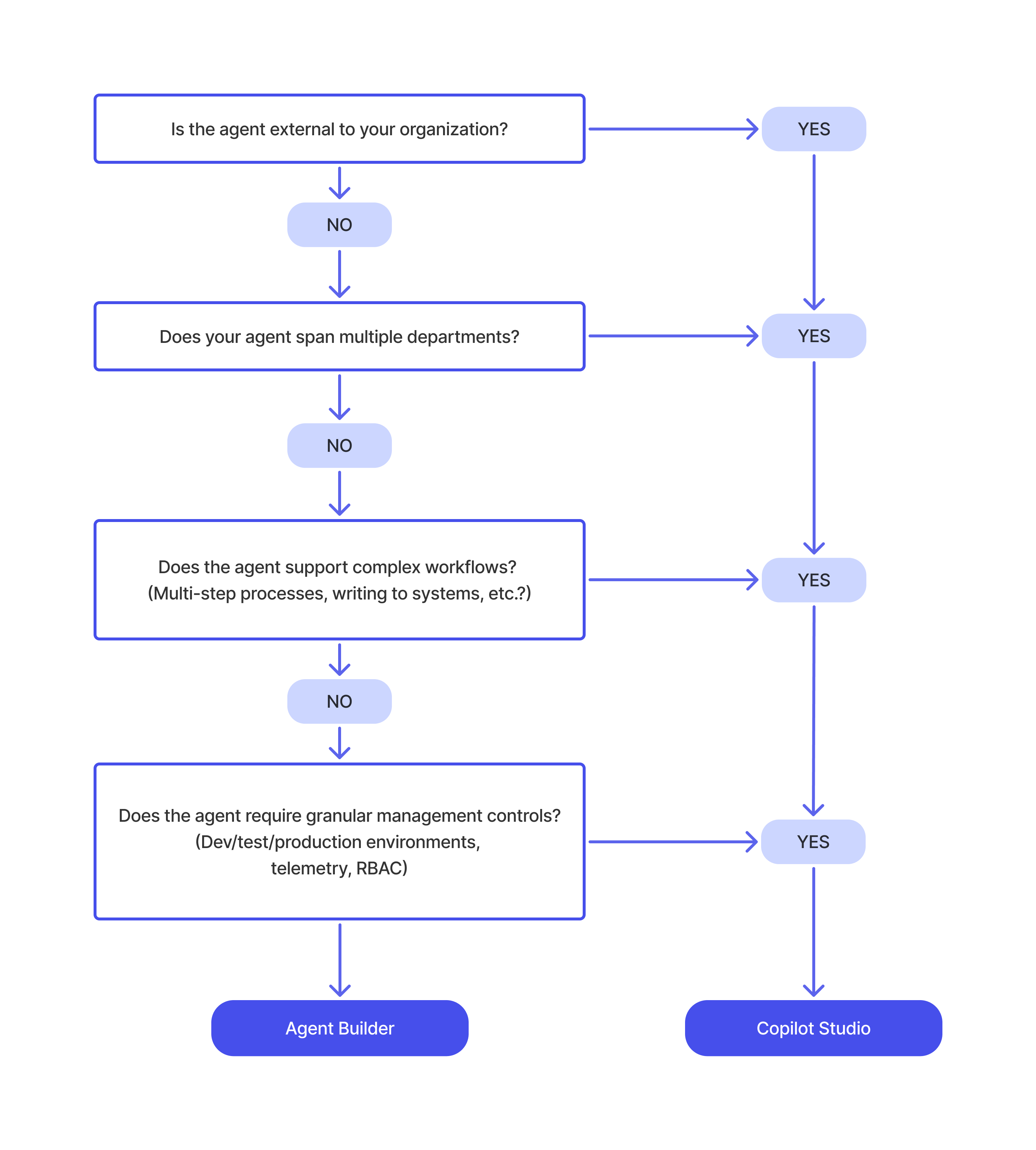
Source: Microsoft Learn