· Pauline Kolde · Strategy · 15 min read
Dynamics 365 Customer Insights AI, Untangled: Copilot, Agents, Cowork and MCP
Copilot, agents, AI Hub, Cowork, MCP: there isn't one Customer Insights AI anymore. Before testing each capability, here's how I tell the three ways AI enters Customer Insights apart.

Please be aware: The content is accurate at the time of creation. It may be that Microsoft has made changes in the meantime.
If you work with Dynamics 365 Customer Insights, you might have noticed that the AI story has become a little… crowded.
We have Copilot. We have agents. We have the new AI Hub. There’s a Journey Creation Agent and an Outreach Optimization Agent. Customer Insights now has an MCP server. And then there’s Copilot Cowork, which can also work with Customer Insights.
If you’re wondering which one actually does what, you’re probably not alone.
My first instinct was to put them into nice little boxes.
Cowork assists. Agents automate. MCP extends.
Unfortunately, it’s not quite that simple.
Cowork can create journeys too. So can the Journey Creation Agent. So can an agent you build yourself on top of the MCP server.
And that’s where things start getting interesting.
This series is also how I’m learning it. For each part, I write down what I expect before testing, check it in a sandbox, and share what held up and what didn’t.
What you’ll get from this part
- A mental model for the three ways AI enters Customer Insights, and where they overlap.
- An overview of who uses, enables and pays for each one.
- A feel for which interaction model fits which situation.
Three ways AI enters Customer Insights
The way I now think about it is not by product name, but by where I start and who comes to whom.
- AI inside Customer Insights: I’m in Customer Insights, and AI comes to me.
- Customer Insights inside my AI workspace: I’m in Cowork, and Customer Insights comes to me.
- Customer Insights as a tool for my own AI: my agent decides when it needs Customer Insights.
Let’s go through them.
1. AI inside Customer Insights
These are the capabilities Microsoft puts directly into the product experience. At the time of writing, the two agents are still in preview, which is important to keep in mind.
I’m in Customer Insights and AI comes to me.
Microsoft currently documents two agents, both managed through the new AI Hub. They solve two quite different problems.
The Journey Creation Agent helps build the journey
Imagine I have this campaign idea:
Create a 30-day re-engagement journey for customers who haven’t opened an email in 90 days. Send the re-engagement email first and follow up five days later.
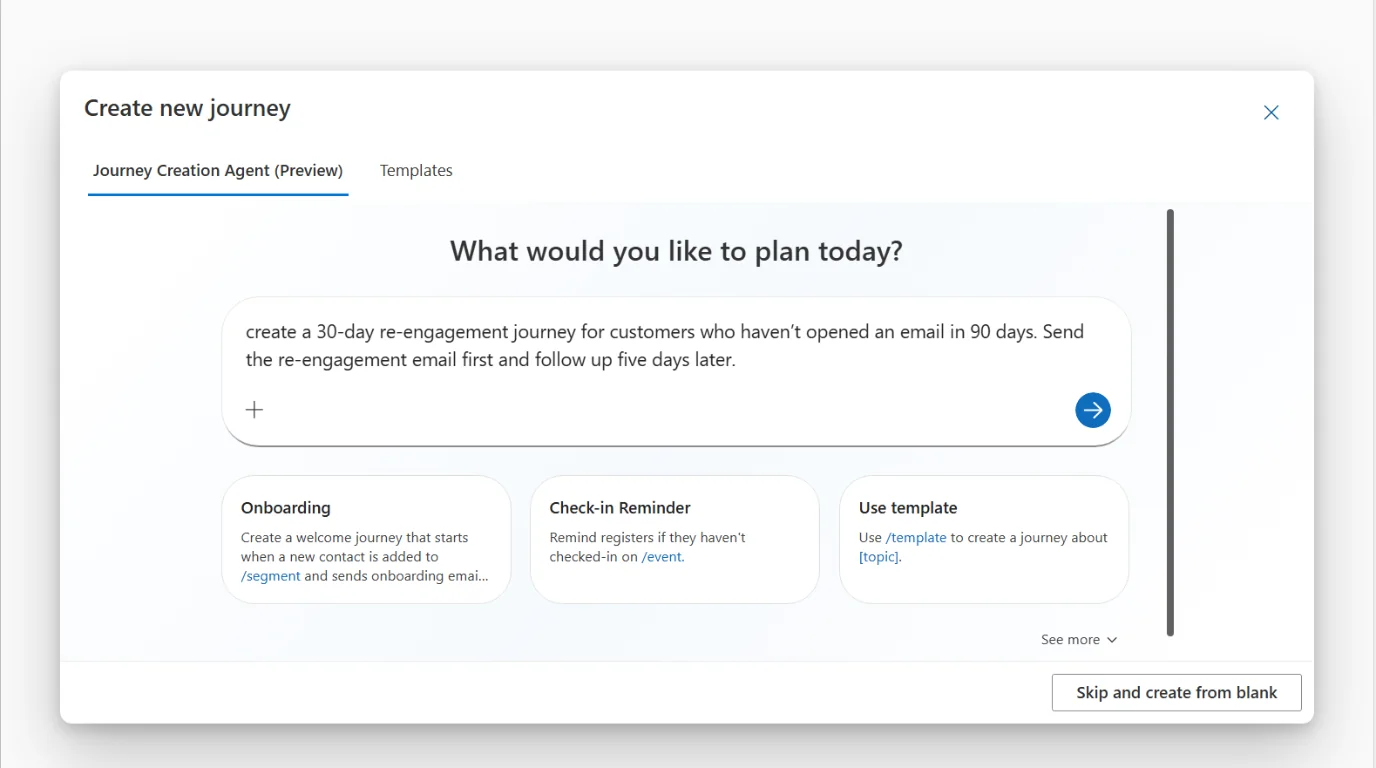
Instead of manually translating that idea into a journey structure, the Journey Creation Agent proposes the structure conversationally: trigger or segment, steps, waits, branches, entry and exit conditions.
I can keep refining it:
“Change the wait to three days.”
Or:
“If they click the first email, skip the second email.”
This isn’t a chatbot explaining how to build a journey. The proposal is opened in the regular journey designer, where I review it and publish it myself.
I like that distinction. The human still owns the journey, but AI takes over some of the translation from “this is what my campaign should do” to “this is how I configure it.”
What it doesn’t do: create segments or write content. It assembles what already exists in your environment. Which means the quality of your segment and email naming suddenly matters a lot more.
The Outreach Optimization Agent decides when to send
Its job isn’t to build your journey. It determines when emails are sent, based on aggregated historical engagement patterns.
Normally, we might build something like:
Email 1 → Wait 3 days → Email 2 → Wait 5 days → Email 3
But why exactly three days?
The Outreach Optimization Agent is a journey step that schedules emails at the times your audience has historically engaged most, while respecting consent and configured quiet times. With several emails, you can set a goal, such as a specific link being clicked, and branch afterwards on whether that goal was met.
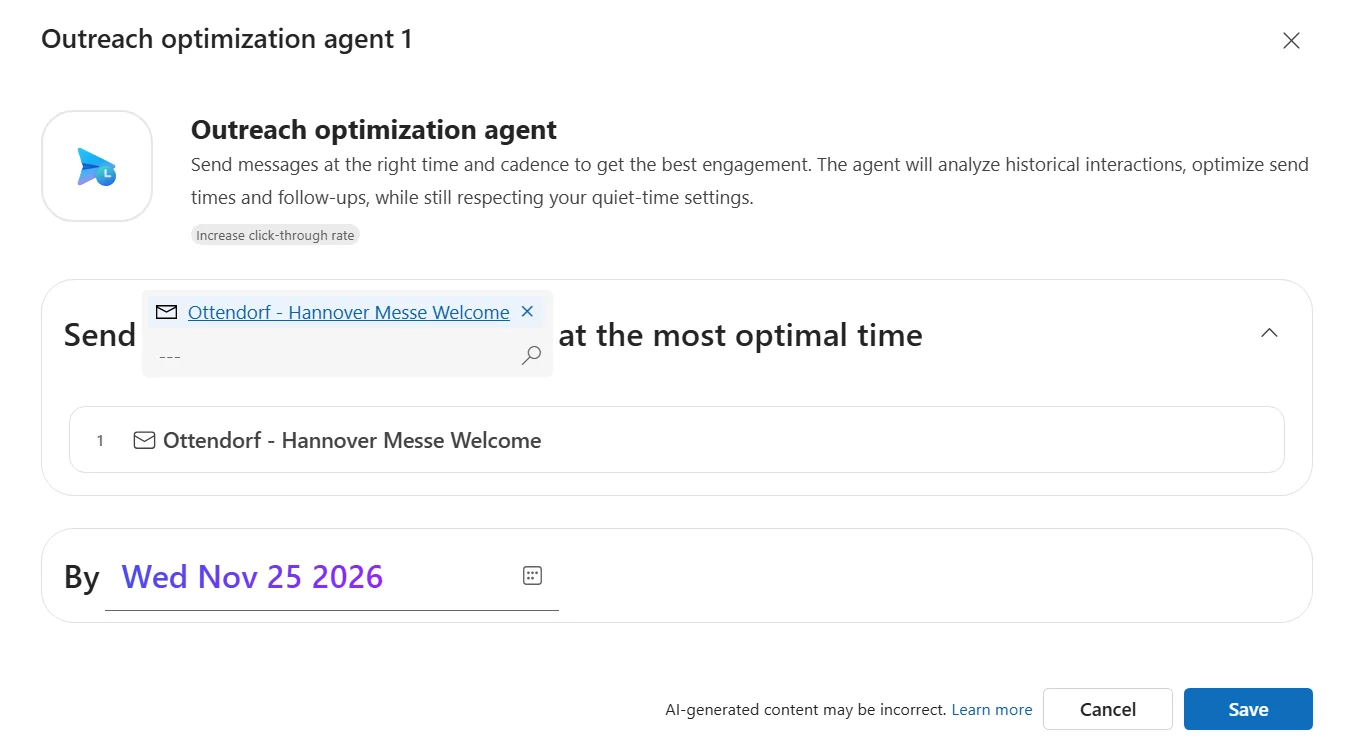
That’s an interesting shift. But I’d be careful not to call it autonomous marketing just yet.
It optimises one specific part of journey execution. It isn’t deciding whether the next best action should be an email, an SMS, a sales call or nothing at all. And the optimisation is based on audience-level patterns, not an individual send time for each person.
Still interesting. Just a slightly different thing.
And then there’s AI Hub
This is another name that causes confusion.
AI Hub isn’t another marketing agent. It’s the settings area in Customer Insights – Journeys where admins manage AI agents and Copilot features: they enable agents, accept prerequisites and set consumption limits for each agent.
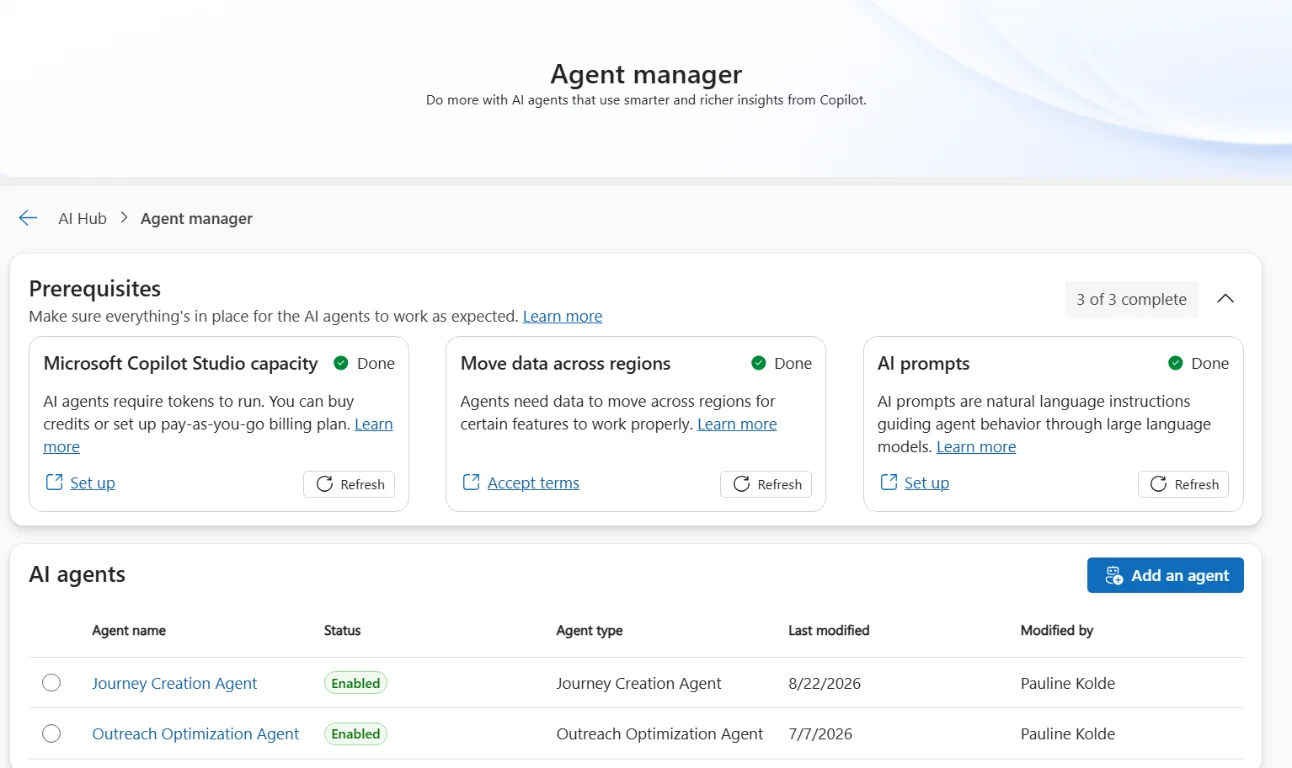
This brings us to topics that aren’t as exciting as asking AI to build a journey, but matter in every real project:
- Is the environment on the right version? AI Hub only appears after upgrading Customer Insights – Journeys to version 1.1.65002.153 or later.
- Is the tenant switch on? AI agents are enabled per environment or environment group in the Power Platform Admin Center. Turn it off there, and all active agents are disabled immediately.
- Do we have Copilot Studio capacity? The agents consume Copilot credits.
- Is AI Builder’s AI prompts feature enabled?
- Are we comfortable with data moving across regions? This is a mandatory prerequisite for the agents, not an optional extra. If anyone withdraws a mandatory prerequisite later, every enabled agent is switched off automatically.
- Do we accept the model provider? The Journey Creation Agent uses Anthropic’s models, which the tenant has to allow as a subprocessor.
- Who gets to manage these capabilities? By default, only users with the Admin role can access AI Hub. With custom security roles, you have to grant permissions on the agent settings table (
msdynmkt_agentsettings) yourself.
For EU organisations, at least two of these questions belong with the data protection officer, not the marketing team.
As always, enabling AI is the easy part. Creating the right governance around it is where things get interesting.
Introduction to AI Hub · Manage prerequisites in AI Hub
I go through these prerequisites step by step, with who needs to approve what, in Part 1: AI Hub prerequisites, setup and approvals (coming 26 November).
Not to forget: Copilot in the designers
Alongside the agents, Customer Insights – Journeys and Data have had Copilot features in the designers for a while: drafting or rewriting email text, creating segments with natural language, generating content ideas and recommending images. In fact, some of these features have been around longer than most Copilot features in other Dynamics 365 modules.
I want to be honest about my experience, though. They started as nice-to-have features to try out, but I haven’t found them particularly useful in practice, and from what I’ve seen, they haven’t evolved much since. If I had to bet on which AI capabilities will make a more meaningful difference, I’d put my money on the newer agents and other ways of bringing AI into Customer Insights.
That’s why these designer features won’t have a dedicated part in this series. I’ll focus on the capabilities I think are more promising, while keeping in mind that your experience may be different. If you want to see what they can do, I covered them earlier in Copilot in Customer Insights – Journeys and Copilot in Customer Insights – Data.
Copilot in Customer Insights – Journeys
2. Customer Insights inside my AI workspace
This is Microsoft 365 Copilot Cowork.
It would be easy to look at it and think:
Great. Another Copilot.
But conceptually, this one flips the direction.
I’m in Cowork and Customer Insights comes to me.
Customer Insights provides a plugin for Cowork with three skills:
- Customer brief and value metrics: a Customer 360 view, segments, measures, predictions and cluster information.
- Customer outreach: resolving segments and audiences, checking consent, and creating emails and journeys after you confirm.
- Email content advisor: reviewing or drafting copy against your brand profiles and checking whether an email is ready to publish.
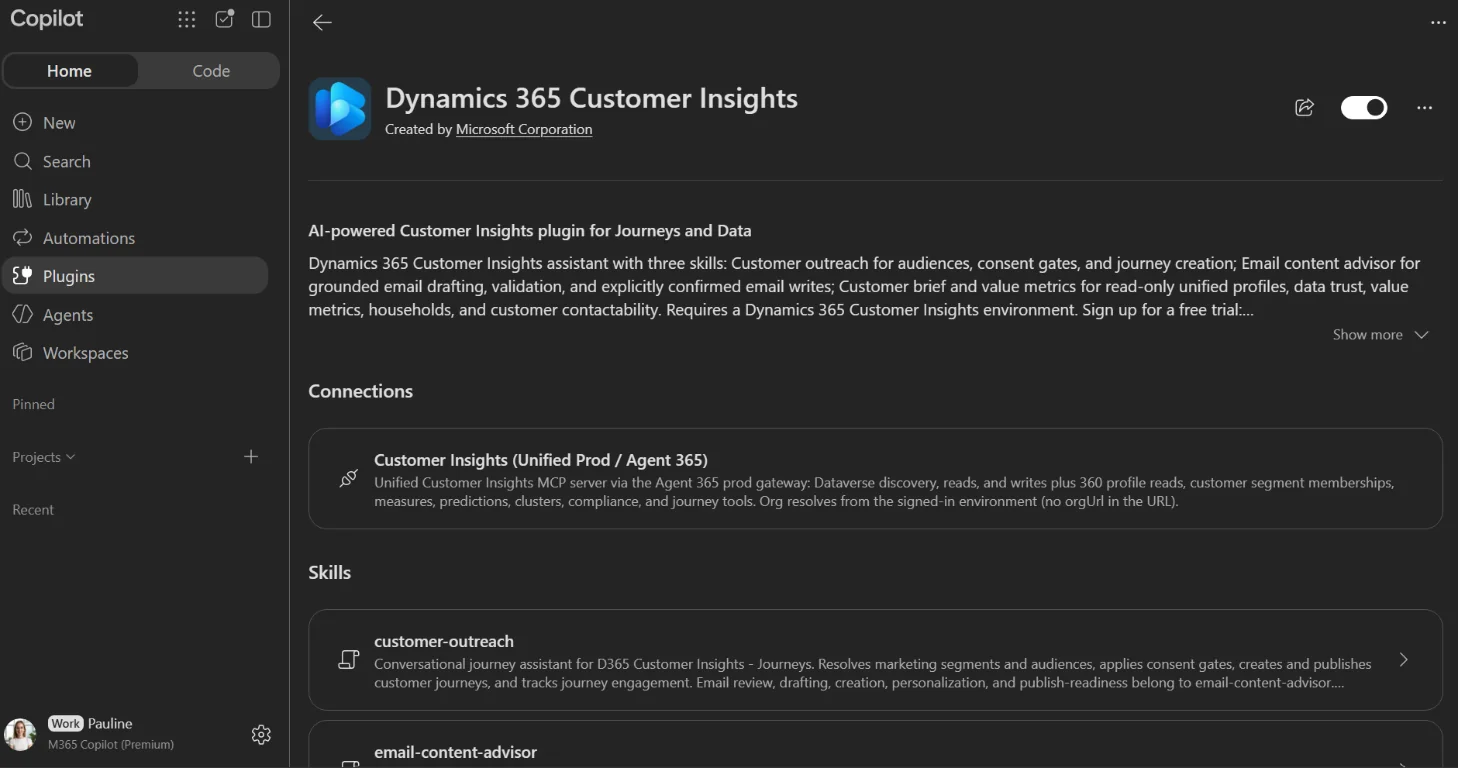
That’s the part I find important. Because Cowork can combine several skills and tools, Customer Insights doesn’t have to be the whole process. I might ask for a customer briefing, turn it into a presentation for a meeting, check consent and then review the email, all in one conversation.
That’s potentially much more interesting than simply “Copilot can create a journey.”
A few things I like about how it’s designed: it asks which profile you mean if a name is ambiguous, it uses your own permissions, and it asks for confirmation before creating anything.
Use Customer Insights skills in Copilot Cowork
3. Customer Insights as a tool for my own AI
And this is the MCP story. It’s also the piece I’m most curious about.
MCP stands for Model Context Protocol. I’m not going to turn this into a protocol lesson, because the practical idea is what matters. Instead of Microsoft determining the AI experience, Customer Insights exposes capabilities as tools, such as:
find_customerget_customer_detailsget_customer_measuresget_customer_predictionscheck_consentvalidate_emailcreate_journey
There are a few more, including get_customer_segments, get_cluster_information, get_unsubscribe_link and list_data_sources, which shows which sources feed into your unified profiles.
One MCP server serves both Customer Insights – Data and Customer Insights – Journeys, but each tool only accesses the app or consent service it requires. Customer profile and data-source tools require Customer Insights – Data; journey and email tools require Customer Insights – Journeys; consent and unsubscribe tools require Customer Insights – Journeys or Shared Consent. In particular, get_customer_segments returns Customer Insights – Data segments only; the MCP tool currently does not return Customer Insights – Journeys segment membership.
Now we can build the experience around them.
My agent decides when it needs Customer Insights.
For me, that’s the architectural shift worth writing about.
The server is reached through Microsoft’s Agent 365 Tooling Gateway. You can connect it to Copilot Studio agents, but also to external clients such as VS Code, Cursor, ChatGPT or Claude Code. Everything runs with the permissions of the signed-in user.
Connect through Agent 365 Tooling Gateway · MCP Server tools reference
Let’s make that more concrete
Imagine I build an agent for our marketing team and ask:
Help me prepare our campaign for Color Cloud 2027.
The agent could use different tools for different parts of the task.
It might resolve customers in Customer Insights – Data and retrieve their Data segment memberships and measures. It could check consent through Customer Insights – Journeys or Shared Consent and validate an existing marketing email through Customer Insights – Journeys. And eventually, after I confirm what it’s about to do, it could create a journey there.
Suddenly, Customer Insights becomes one part of a much larger agent experience. To me, this is where MCP gets much more interesting than the acronym makes it sound.
Two things to keep in mind, though. That “after I confirm” step doesn’t come for free: in your own agent, you have to build it in. And create_journey isn’t idempotent. If an agent retries a failed call, you can end up with two journeys.
The comparison
Put side by side, the difference is less about features and more about the interaction model:
| AI inside Customer Insights | Cowork | MCP | |
|---|---|---|---|
| Where do I start? | Customer Insights | Microsoft 365 Copilot | My own agent |
| Who defines the experience? | Microsoft | Microsoft, through Cowork | Me |
| Primary idea | AI assists a Customer Insights task | AI orchestrates work using Customer Insights | Customer Insights becomes a tool for an agent |
| Example | “Build this journey.” | “Prepare this campaign and create the required assets.” | My marketing agent checks consent before taking an action |
| Scope | A specific Customer Insights scenario | Broader task orchestration | Composable building blocks |
And here’s the important point, the one I was missing when I tried to draw boxes:
These aren’t mutually exclusive.
Cowork’s skills and your own MCP agent call into the same platform. All three can end up creating a journey. They just get there from different starting points, with different people deciding what the experience looks like.
The same map, from a project perspective
| Copilot in the designers | AI Hub agents | Cowork plugin | MCP server | |
|---|---|---|---|---|
| Way in | AI inside Customer Insights | AI inside Customer Insights | Customer Insights inside my AI workspace | Customer Insights as a tool for my own AI |
| Where | Journeys / Data designers | Inside Customer Insights – Journeys | Microsoft 365 Copilot | Copilot Studio, external MCP clients |
| Typical user | Marketer | Marketer | Marketer, account manager | Maker, developer |
| Who switches it on | Admins in the feature switches | Tenant admin (PPAC) and Journeys admin (AI Hub) | Admin makes the plugin available and enables the Dataverse MCP server; user enables the plugin | Admin (gateway permission and consent) |
| Billing | Applicable Customer Insights license | Copilot Studio capacity (Copilot credits; prepaid or pay-as-you-go) | Microsoft 365 Copilot + appropriate Customer Insights license | Varies by MCP client; the required Customer Insights app and user access still apply |
| Creates things? | Only when applied | Journeys only, at the moment | After confirmation | Creates journeys (create_journey is the only write tool) |
Is this already agentic marketing?
Well… parts of it certainly start to look like it.
But I’d be careful with the term. Right now, we’re looking at several specialised capabilities:
- One agent helps me build journeys.
- Another helps optimise email timing.
- Cowork orchestrates work across Microsoft 365, using Customer Insights where it needs to.
- MCP makes Customer Insights capabilities available as building blocks for agents we design ourselves.
That doesn’t mean we suddenly have one autonomous marketing agent running the entire marketing department. And honestly, I don’t think that should be the goal anyway.
What I find much more interesting is specialised agents and tools working together around one customer and marketing platform.
So instead of asking:
“Which AI will replace this task?”
I think the more useful question is:
Which parts of this process can AI help with, and where do I still want a human to make the decision?
That’s a much more realistic conversation to have.
There’s one big BUT
A lot of this is new, and some of the most interesting capabilities are still in preview.
That matters. Preview is where I experiment. It’s where I try things out and think about what they could mean for future projects. Microsoft itself says preview features aren’t meant for production use.
It’s not automatically where I build a business-critical marketing process that needs to run reliably for the next three years.
There are also practical questions hiding underneath all the shiny functionality:
- What data does the agent actually have access to?
- How good is my Customer Insights setup in the first place?
- Are my segments and triggers structured and named properly?
- Is consent configured correctly?
- Do I have usable content and brand profiles?
- Who is allowed to let an agent create something?
An agent doesn’t magically fix a messy Customer Insights environment. If anything, I suspect we’ll discover the opposite:
The easier AI makes it to use Customer Insights, the more important a clean Customer Insights architecture becomes.
That’s something I’ll be watching very closely.
For customers
You probably don’t need all of this at once. A sensible order:
- Find out what’s already enabled in your environment. Some Copilot features may already be on.
- Decide who approves AI features: IT, the data protection officer, marketing leadership.
- Start with the way in closest to how your team already works. For most marketing teams, that’s AI inside Customer Insights: Copilot in the designers and, later, the AI Hub agents. Not MCP.
For consultants
The question clients ask isn’t “what can it do?”, but “what do we have to approve, and what does it cost?” Map those two answers for each way in before demoing anything.
And be careful with the word “agent”. In this landscape, it covers anything from a journey step to an external client calling Dataverse.
Where do we go from here?
This post was intentionally the overview. In the next parts, I’ll get hands-on with the capabilities from this map, starting with AI Hub prerequisites, setup and approvals (coming 26 November), and then roughly along these themes:
- The agents inside Customer Insights: how well the Journey Creation Agent and the Outreach Optimization Agent hold up in practice.
- Customer Insights in Cowork: what changes when Customer Insights shows up in our everyday Microsoft 365 work.
- MCP for builders: the tools, the setup, and what we could build with them.
The exact order and split may change as I test. There’s quite a lot to try out, so let’s get started. You can follow all parts in the Customer Insights AI series overview.
Open questions
What I don’t know yet and plan to find out:
- Does the Journey Creation Agent find segments built in Customer Insights – Journeys, or only Customer Insights – Data segments?
- How many Copilot credits does a typical agent session consume?
- Where are consent checks made by agents logged, if at all?
- When Cowork and the Journey Creation Agent are asked for the same journey, how different are the results?
If you’ve already tested any of this, I’d like to hear what you found.
Sources
- Introduction to AI Hub in Customer Insights – Journeys (preview)
- Manage prerequisites in AI Hub (preview)
- Journey Creation Agent in Customer Insights – Journeys (preview)
- Outreach Optimization Agent in Customer Insights – Journeys (preview)
- Use Dynamics 365 Customer Insights skills in Copilot Cowork
- Connect Customer Insights – Journeys through Agent 365 Tooling Gateway
- MCP Server tools reference for Customer Insights – Journeys
- Copilot in Customer Insights – Journeys
Do you have questions, ideas or remarks? Feel free to get in touch.